Train Qwen3-1.7B to play Wordle with GRPO
training small language models for specialized tasks such as math, coding, or word games using reinforcement learning has become a popular post-training method. in this example i walk through how you can train your own model to play wordle using an A100 for ~$5-6 on modal !!
i'm sure you've heard of wordle by now - it is a game where you find the five letter word in six guesses, and get feedback on the placement of the letters for every guess. this makes it a perfect problem to use multi-turn RL for. we can use the grpo trainer from TRL library to train the model and textarena for the wordle environment.
why modal
i had three problems during rl training runs on rented gpus. first was that datasets and checkpoints would get deleted when i stopped an instance. second, installing and re-installing packages everytime i start a new instance, and third, the instance bills you even for idle time.
modal solved all three of these:
- volumes - i can now mount all the data and model checkpoints that need to persist across restarts
- images - all imports and installations can be done inside containers
- cost - modal does not charge you when gpu is idle
try on modal
before we start training, if you're just interested in running this example on Modal, you can do so by simple cloning my repo, and running with these commands:
$ git clone https://github.com/aryagxr/woRLdle.git
$ cd woRLdle
$ modal run --detach modal-run.py::train_vllm_colocate_mode
building a modal image
first we make all the necessary imports and define the modal app.
from __future__ import annotations
import os
import re
import subprocess
from pathlib import Path
import modal

app: modal.App = modal.App("wordle-grpo-trl")
now we can build the modal image with the following image definition. it is a nice way to keep all the installations you need inside the container. the textarena wordle env can be installed from huggingface space. i'm also installing wandb to log my runs.
image: modal.Image = (
    modal.Image.debian_slim()
    .apt_install("git")
    .uv_pip_install(
        "trl[vllm]",
        "git+https://huggingface.co/spaces/openenv/wordle",
        "wandb",
        "git+https://github.com/huggingface/transformers.git@main",
        "datasets",
        "jmespath",
    )
)
next, we can import the packages inside the modal image like so:
with image.imports():
    from datasets import Dataset
    from textarena_env import TextArenaAction
    from textarena_env.server.environment import TextArenaEnvironment
    from trl import GRPOConfig, GRPOTrainer
next we can define a modal volume to mount model checkpoints as well as the base model. this allows the checkpoints and the hf cache to persist across runs even if we restart the container.
models_dir = Path("/models")
hf_hub_cache_dir = "/root/.cache/huggingface"

checkpoints_volume: modal.Volume = modal.Volume.from_name(
    "wordle-grpo-checkpoints", create_if_missing=True
)

hf_cache_volume: modal.Volume = modal.Volume.from_name(
    "wordle-grpo-hf-cache", create_if_missing=True
)

train_volumes: dict[str, modal.Volume] = {
    str(models_dir): checkpoints_volume,
    hf_hub_cache_dir: hf_cache_volume,
}
system prompt
now that we're done setting up, we need to define the system prompt which helps guide the model to make guesses and tells it the game rules.
model_name = "Qwen/Qwen3-1.7B"
hub_model_id = "wordle-grpo-Qwen3-1.7B"

SYSTEM_PROMPT = """\
You are an expert Wordle solver with deep knowledge of English vocabulary, \
letter frequency patterns, and optimal guessing strategies.

Follow these rules to play Wordle:

1. The target is a 5-letter English word.
2. You have 6 attempts to guess the correct word.
3. After each guess you receive color-coded feedback:
   - GREEN (G): Letter is correct and in the correct position.
   - YELLOW (Y): Letter is in the word but in the wrong position.
   - GRAY (X): Letter is not in the word at all.
4. All guesses must be valid 5-letter English words.
5. You cannot reuse a word you have already guessed.
6. Use the tool `guess` to submit each guess.
"""
wordle environment
we can now create our own wordle environment class that directly wraps TextArenaEnvironment so we can use it inside our modal container as a python library. initially i had tried duplicating the hf wordle space to my own account as suggested in the openenv wordle tutorial but ran into websocket errors so figured directly running TextArena's env in the container would be a better way.
class WordleEnv:
    def __init__(self):
        self._env = TextArenaEnvironment(env_id="Wordle-v0", num_players=1)
        self.reward = 0.0
        self.done = False
        self.green_count = 0
        self.yellow_count = 0
        self.correct = 0.0
        self.repetition_score = 1.0
        self._guesses: set[str] = set()
        self._total_guesses = 0

    def reset(self, **kwargs):
        obs = self._env.reset()
        self._last_full_feedback = obs.messages[0].content
        self.reward = 0.0
        self.done = False
        self.green_count = 0
        self.yellow_count = 0
        self.correct = 0.0
        self.repetition_score = 1.0
        self._guesses = set()
        self._total_guesses = 0
        return self._last_full_feedback

    def _parse_feedback(self, feedback):
        for line in feedback.splitlines():
            tokens = line.strip().split()
            if len(tokens) == 5 and all(t in ("G", "Y", "X") for t in tokens):
                greens = tokens.count("G")
                yellows = tokens.count("Y")
                self.green_count = max(self.green_count, greens)
                self.yellow_count = max(self.yellow_count, yellows)
                if greens == 5:
                    self.correct = 1.0
                return

    def _track_repetition(self, guess):
        self._total_guesses += 1
        word = re.sub(r"[\[\]]", "", guess).strip().lower()
        self._guesses.add(word)
        self.repetition_score = len(self._guesses) / self._total_guesses

    def guess(self, guess):
        """
        Make a guess in the Wordle environment.

        Args:
            guess: The guessed word, formatted as '[abcde]'

        Returns:
            The feedback message from the environment.
        """
        if self.done:
            raise ValueError("Game over.")
        obs = self._env.step(TextArenaAction(message=guess))
        full_feedback = obs.messages[0].content
        feedback = full_feedback[len(self._last_full_feedback):]
        self._last_full_feedback = full_feedback
        if "You attempted an invalid move" in feedback:
            self.done = obs.done
            return feedback
        self._parse_feedback(feedback)
        self._track_repetition(guess)
        self.done = obs.done
        return feedback
shaped rewards
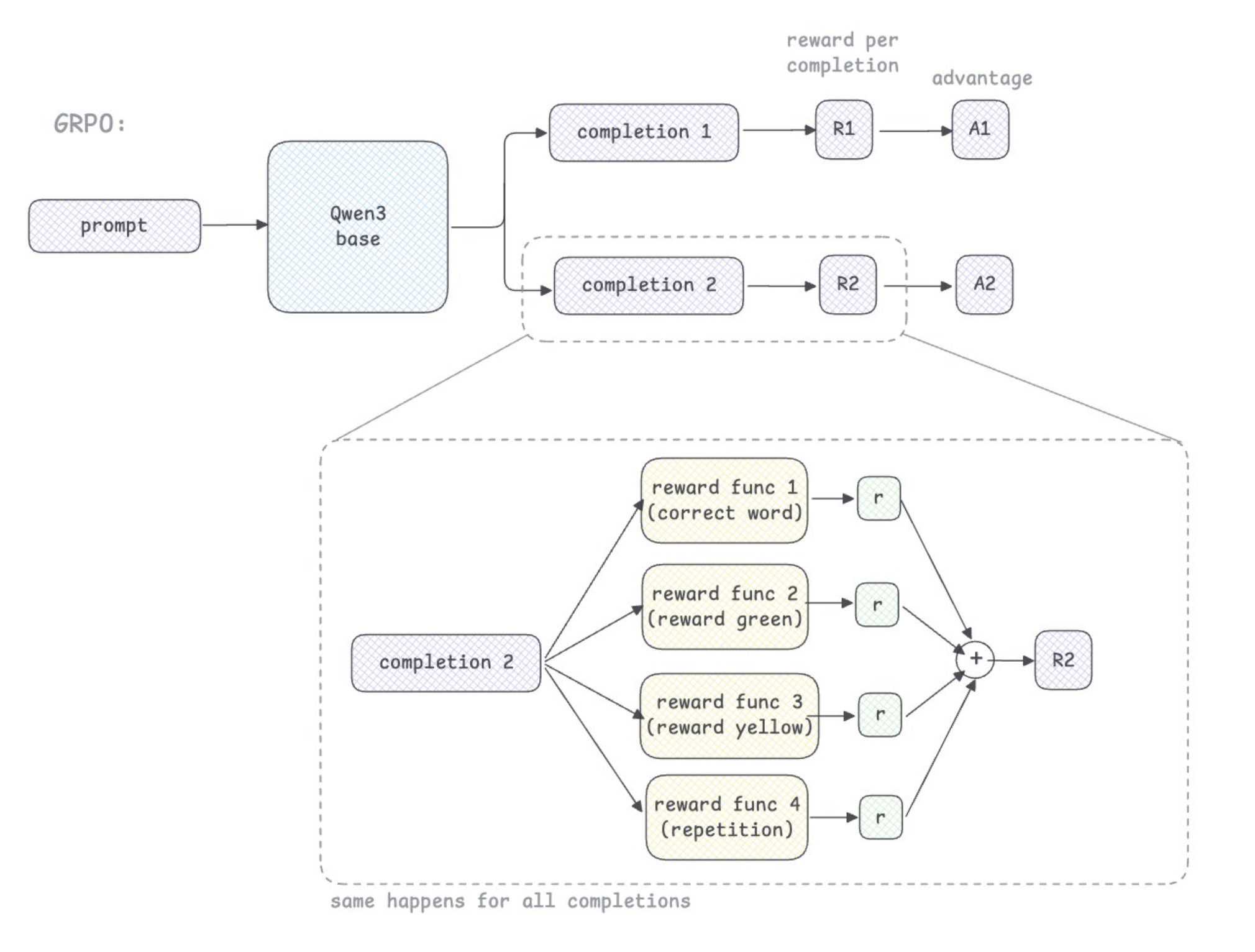
here we define four different reward functions that will later be weighted when passed into the grpo trainer. this will help the model learn better as opposed to a simpler binary reward function. this is done by partially rewarding the model for its green or yellow letters even if the guess is wrong or loses the game.
def reward_correct(environments, **kwargs):
    """1.0 if the model solved the word, 0.0 otherwise."""
    return [env.correct for env in environments]


def reward_greens(environments, **kwargs):
    """Best fraction of greens seen this episode (0.0–1.0)"""
    return [env.green_count / 5.0 for env in environments]


def reward_yellows(environments, **kwargs):
    """Best fraction of yellows seen this episode (0.0–1.0)"""
    return [env.yellow_count / 5.0 for env in environments]


def reward_repetition(environments, **kwargs):
    """Unique valid guesses / total valid guesses (1.0 if no repeats)"""
    return [env.repetition_score for env in environments]
grpo trainer
GRPO is a technique where the base model generates multiple completions per prompt and these completions are used to calculate the advantage relative to other rewards in the same group. in the context of wordle, the model plays multiple rollouts of the game and compares them.
for my script, i'm only using 2 completions (num_generations=2).
enviornment_factory takes care of this rollout function for us. without it we'd have to write a rollout function to handle model calls, parse output, step the environment etc.
here's a rough diagram on how grpo works:
def start_grpo_trainer(use_vllm=False, vllm_mode=None):
    os.environ.setdefault("WANDB_PROJECT", "wordle-grpo")

    #each dataset row is one rollout episode. num_generations=2 for 2 completions

    dataset: Dataset = Dataset.from_dict(
        {
            "prompt": [
                [{"role": "user", "content": SYSTEM_PROMPT}]
                for _ in range(3200)
            ]
        }
    )

    grpo_config: GRPOConfig = GRPOConfig(
        output_dir=str(models_dir / hub_model_id),
        save_steps=10,
        save_total_limit=1,
        num_train_epochs=1,
        learning_rate=1e-6,
        gradient_accumulation_steps=48,
        per_device_train_batch_size=1,
        warmup_steps=10,
        optim="adamw_torch",
        max_grad_norm=1.0,
        gradient_checkpointing=True,
        num_generations=2,
        max_completion_length=1024,
        log_completions=True,
        num_completions_to_print=2,
        chat_template_kwargs={"enable_thinking": False},
        use_vllm=use_vllm,
        vllm_mode=vllm_mode,
        vllm_gpu_memory_utilization=0.15,
        vllm_max_model_length=3072,
        report_to="wandb",
        run_name=os.environ.get("WANDB_NAME", "wordle-grpo-modal"),
        logging_steps=1,
        reward_weights=[3.0, 1.0, 0.5, 1.5],
        push_to_hub=True,
        hub_model_id=hub_model_id,
    )

    trainer = GRPOTrainer(
        model=model_name,
        reward_funcs=[reward_correct, reward_greens, reward_yellows, reward_repetition],
        train_dataset=dataset,
        args=grpo_config,
        environment_factory=WordleEnv,
    )

    trainer.train()
    trainer.save_model(str(models_dir / hub_model_id))
    trainer.push_to_hub()
    checkpoints_volume.commit()
    hf_cache_volume.commit()
for more background on how grpo works, you can read DeepSeek's paper.
kick off training
finally, we can use modal function to kick off training inside the container. the decorator @app.function defines it as a modal function and we specify the container image it will run on. we pass in parameters to the function to use the image we created, use A100-80GB GPU, the huggingface and wandb secrets, and the volumes we mounted earlier.
make sure to use modal secrets to store your credentials/ API keys for huggingface and wandb as you setup. you can do that by replacing with your tokens and running these:
modal secret create huggingface-secret HF_TOKEN=<hf_..your-token>
modal secret create wandb-secret WANDB_API_KEY=<your-key>
we can use vLLM to speed up the model's completion generation phase to make training faster. also, in this example i'm using colocate mode - which means that vLLM will run on the same GPU that the grpo trainer runs on. this way we don't need two seperate GPUs. for this case it is sufficient since the base model is quite small and vllm_gpu_memory_utilization=0.15.
here is the function:
@app.function(
    image=image,
    gpu="A100-80GB",
    timeout=60 * 60 * 4,
    secrets=[
        modal.Secret.from_name("huggingface-secret"),
        modal.Secret.from_name("wandb-secret"),
    ],
    volumes=train_volumes,
)
def train_vllm_colocate_mode():
    os.environ["RANK"] = "0"
    os.environ["LOCAL_RANK"] = "0"
    os.environ["WORLD_SIZE"] = "1"
    os.environ["MASTER_ADDR"] = "localhost"
    os.environ["MASTER_PORT"] = "12355"
    start_grpo_trainer(use_vllm=True, vllm_mode="colocate")
however if you do have dedicated GPUs for inference, you can run vllm on server mode as shown below. in this case the vllm server communicates over HTTP with the trainer.
@app.function(
    image=image,
    gpu="A100-80GB:2",
    timeout=60 * 60 * 4,
    secrets=[
        modal.Secret.from_name("huggingface-secret"),
        modal.Secret.from_name("wandb-secret"),
    ],
    volumes=train_volumes,
)
def train_vllm_server_mode():
    env_copy = os.environ.copy()
    env_copy["CUDA_VISIBLE_DEVICES"] = "0" #vllm server

    subprocess.Popen(
        ["trl", "vllm-serve", "--model", model_name],
        env=env_copy,
    )

    os.environ["CUDA_VISIBLE_DEVICES"] = "1" #trainer
    start_grpo_trainer(use_vllm=True, vllm_mode="server")
depending on the vllm mode you chose, you can run its respective command to start a training run. adding the --detach flag makes sure the training continues even if you kill your terminal.
#colocate mode
$ modal run --detach modal-run.py::train_vllm_colocate_mode

#server mode
$ modal run --detach modal-run.py::train_vllm_server_mode
results
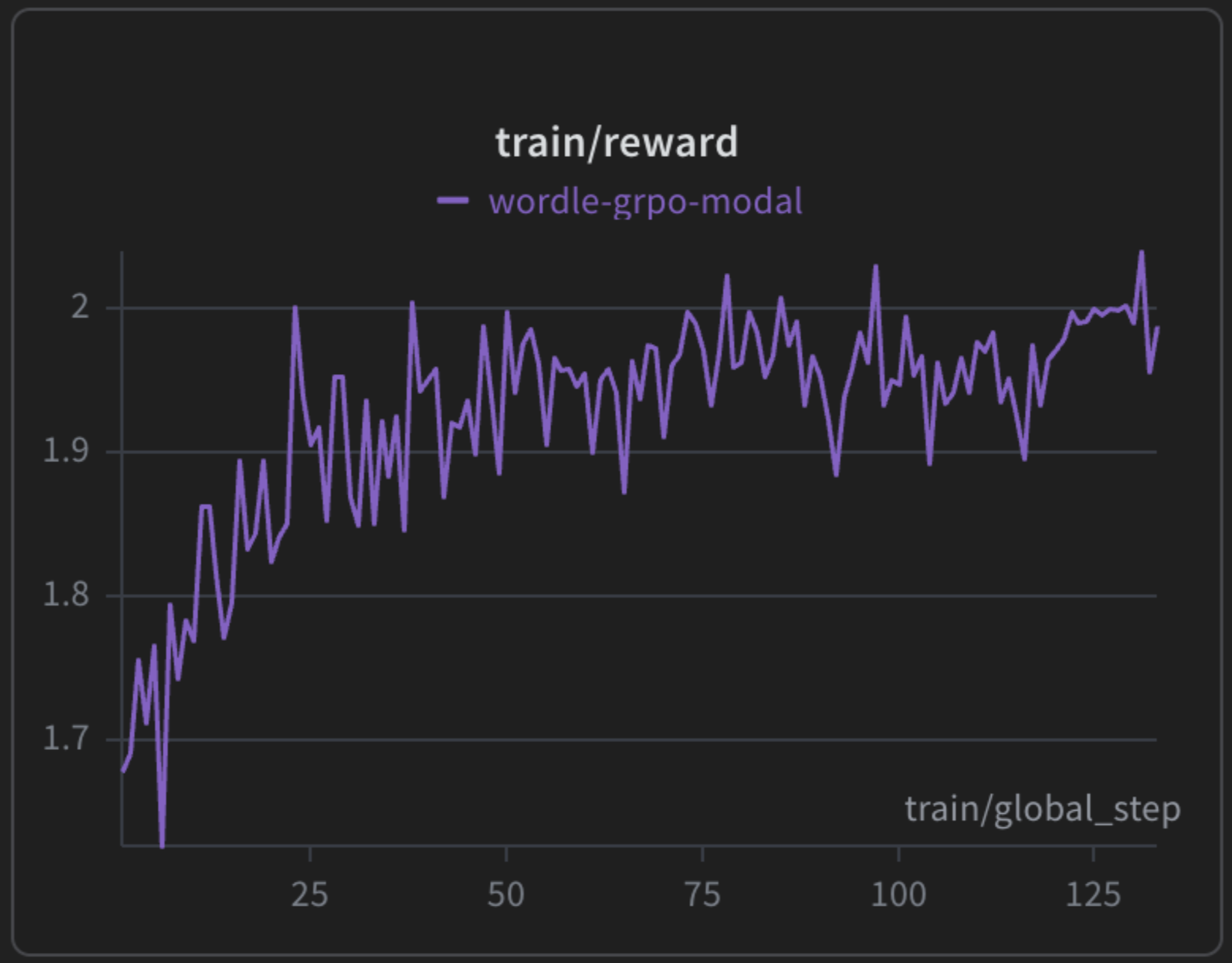
here is the reward curve logged on wandb. the reward went from 1.6 to 2.3 meaning that the model is learning. due to compute contraints i limited my model to 3200 episodes, gradient_accumulation_steps = 48, and num_generations = 2. to improve i would increase number of episodes and number of completions to 4 or higher. regardless, i'm happy to see a slightly increasing reward curve :)
serve on modal
lastly, we can serve our fine tuned model via an open ai compatible endpoint with vllm. with modal, you can do this easily with the decorator @modal.web_server which registers a HTTP server inside the container. you can then call this url with curl.
again, we define another modal image for serving and install vllm and flashinfer.
VLLM_PORT: int = 8000

vllm_image = (
    modal.Image.debian_slim(python_version="3.12")
    .uv_pip_install(
        "vllm==0.12.0",
        "flashinfer-python==0.5.3",
        extra_index_url="https://download.pytorch.org/whl/cu128",
        extra_options="--index-strategy unsafe-best-match",
    )
    .env({"VLLM_USE_V1": "1"})
)
we also need the model checkpoints mounted to our volume in /models for serving
vllm_cache_vol = modal.Volume.from_name("vllm-cache", create_if_missing=True)


serve_volumes: dict[str, modal.Volume] = {
    "/root/.cache/vllm": vllm_cache_vol,
    str(models_dir): checkpoints_volume,
    hf_hub_cache_dir: hf_cache_volume,
}
helper function to get the latest checkpoint
def get_latest_checkpoint_path():
    run_output_dir = models_dir / hub_model_id
    found: list[tuple[int, Path]] = []
    for base in (run_output_dir, models_dir):
        if not base.is_dir():
            continue
        for child in base.iterdir():
            if not child.is_dir():
                continue
            m = re.match(r"^checkpoint-(\d+)$", child.name)
            if m:
                found.append((int(m.group(1)), child))
    if found:
        _step, path = max(found, key=lambda t: t[0])
        return str(path)
    if run_output_dir.is_dir() and (run_output_dir / "config.json").exists():
        return str(run_output_dir)
    raise FileNotFoundError(
        f"No checkpoint-* or config.json under {run_output_dir} (or top-level {models_dir}). "
        "Train once and commit the checkpoints volume before deploying serve."
    )
lastly here's the serve function to tell modal to forward http to port 8000 inside the container using the web_server decorator.
@app.function(
    image=vllm_image,
    gpu="A100-80GB",
    scaledown_window=15 * 60,
    timeout=10 * 60,
    secrets=[modal.Secret.from_name("huggingface-secret")],
    volumes=serve_volumes,
)
@modal.concurrent(max_inputs=32)
@modal.web_server(port=VLLM_PORT, startup_timeout=10 * 60)
def serve():
    checkpoint_path = get_latest_checkpoint_path()
    cmd = [
        "vllm",
        "serve",
        "--uvicorn-log-level=info",
        checkpoint_path,
        "--tokenizer",
        model_name,
        "--served-model-name",
        "wordle-grpo",
        "--max-model-len",
        "8192",
        "--host",
        "0.0.0.0",
        "--port",
        str(VLLM_PORT),
    ]
    subprocess.Popen(cmd)
to deploy the web endpoint, run the command:
modal deploy modal-run.pythis gives you a web function URL which you can then POST a chat completion using this curl command for a quick test to make sure the api works!
curl -sS "$BASE/v1/chat/completions" \
  -H "Content-Type: application/json" \
  -d '{
    "model": "wordle-grpo",
    "messages": [{"role": "user", "content": "Say hello to test!!."}],
    "max_tokens": 64
  }'
closing
hope this guide was helpful to train your own slm for any task of your choice on modal. you can find all the code here.
👋